Ugh, the absolute heart-sinking moment when you're buzzing from packing a sick player in Ultimate Team, your fingers are flying, and... oops. You've just quick sold your shiny new card by mistake. 😭 We've all been there, that split-second of excitement turning into pure panic. But hey, don't freak out just yet! I found out EA actually has a hidden gem of a feature to save the day. It's not in the main game though, you've gotta know where to look. Let me walk you through the whole recovery process, straight from my own 'oh no' experience to getting my player back safely.
Quick Sell recovery in EA Sports FC 25 is like a secret backdoor—it's only accessible through the EA FC Web App or the Mobile Companion App. You can't do it directly from your console or PC game client. So, first things first, you need to get set up on one of those. The Companion app is a quick download from the Apple App Store or Google Play Store, and the web app works anywhere. Once you're logged in with your EA account, the magic (and relief) can begin.
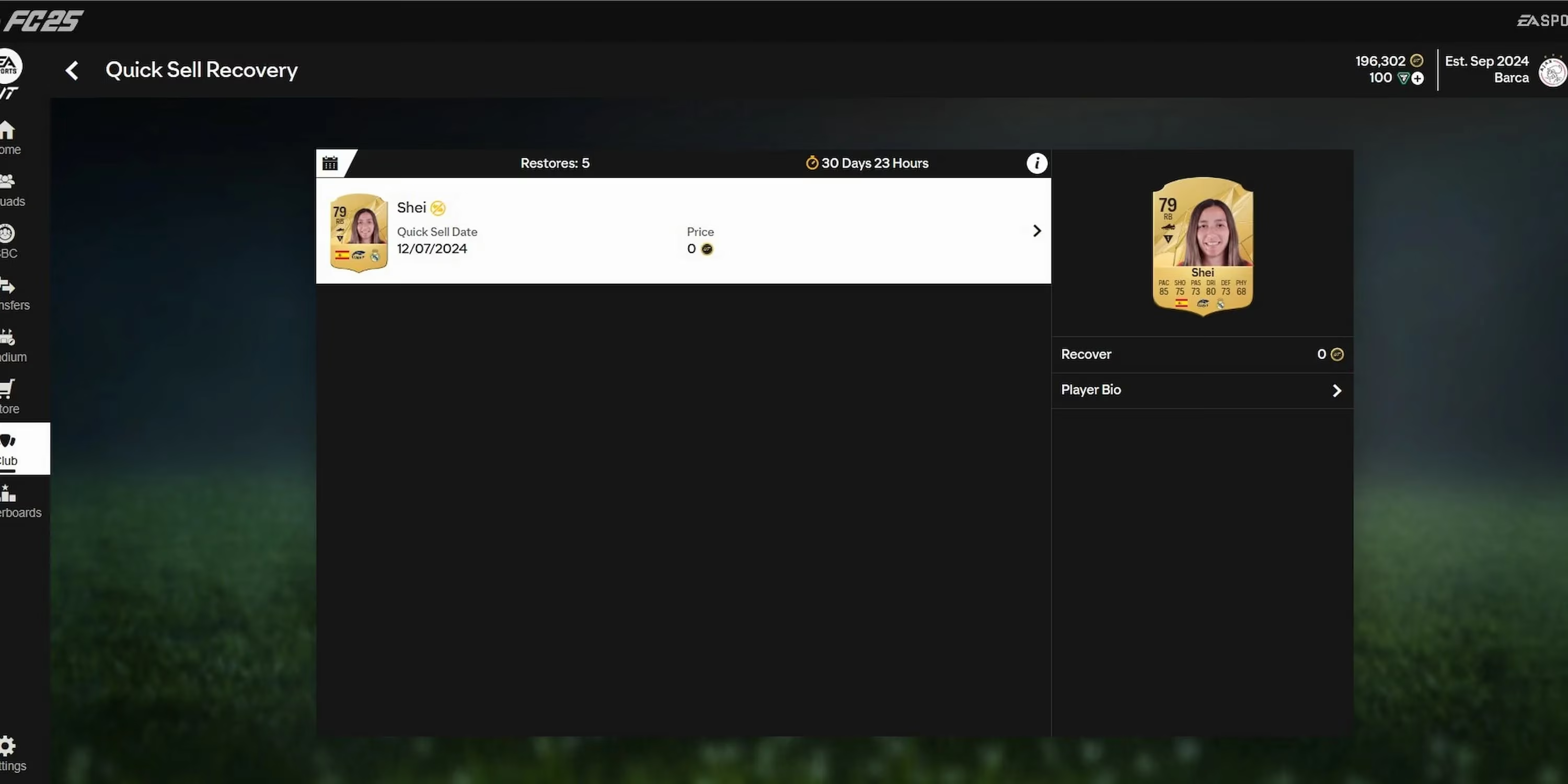
Here’s your step-by-step rescue mission:
-
Log In: Head to the FC Ultimate Team Web App in your browser or open your Mobile Companion App. Punch in your EA account details.
-
Navigate: Look for the 'Club' menu on the left side of the screen. That's your gateway.
-
Find the Option: Inside the Club menu, you'll spot 'Quick Sell Recovery'. Click it, and voilà—a list of players you can potentially get back will appear.
-
Recover: See your lost gem? Click on the player, then hit the 'Recover' button on the right. The card will be sent to your 'Unassigned Items'.
-
Claim: Finally, go to the 'Store' tab, click on 'Unassigned Items', and move your beloved player back into your club. Phew! Crisis averted.
Now, before you get too comfy thinking you can undo any mistake, there are some super important rules. Think of them as the fine print for this get-out-of-jail-free card. EA gives you a safety net, but it's got limits.
⚠️ The Non-Negotiable Rules for Recovery:
-
The 7-Day Window: This one's crucial. You only have 7 days from the moment you quick sold the player to initiate the recovery. After that... poof! The card vanishes from the recovery menu forever. Talk about a ticking clock!
-
The 5-Player/31-Day Limit: EA isn't running an unlimited returns policy. You can recover a maximum of 5 players within a 31-day period. It's like a monthly allowance for your oopsies. After 31 days, your count resets to zero. So use your recoveries wisely!
-
What CAN'T Be Recovered:
-
Consumables (like fitness or healing cards) ❌
-
Managers ❌
-
Club Items (kits, badges, stadiums) ❌
-
Loan Player Cards ❌
-
Basically, only standard player cards are eligible. Bummer, I know.
-
-
The Cost for Tradeable Cards: Here's the kicker—if the player you sold was tradeable, recovering them isn't free. You need to have the player's discard value in coins ready in your account. The system will deduct those coins once you hit recover. Consider it a small redemption fee for your haste.
So there you have it! It's a fantastic feature that's saved my Ultimate Team more than once, but it's not a cure-all. My advice? Slow down when you're in your club, maybe take a breath before mass-discarding items. But if disaster does strike, now you know the drill. Head straight to the app, check the rules, and get your player back. Happy gaming, and may your quick sells always be intentional! 🎮✨
P.S. Remember, this info is fresh for 2026, so you're getting the latest scoop. The process has been pretty consistent, but always good to know it's current!
Comments