Honestly, dealing with lag in EA Sports FC 25 was driving me crazy! 😤 One moment you're about to score a perfect goal, the next the game freezes or stutters, and suddenly your opponent has the ball. It's the worst, especially in Ultimate Team or Career Mode where every single input matters for your record. And don't even get me started on menu lag—trying to complete an SBC or just scroll through your club felt like wading through mud. It's 2026, and we shouldn't have to put up with this! Thankfully, after some digging and testing, I found a super simple fix that completely transformed my experience. Let me break it down for you.
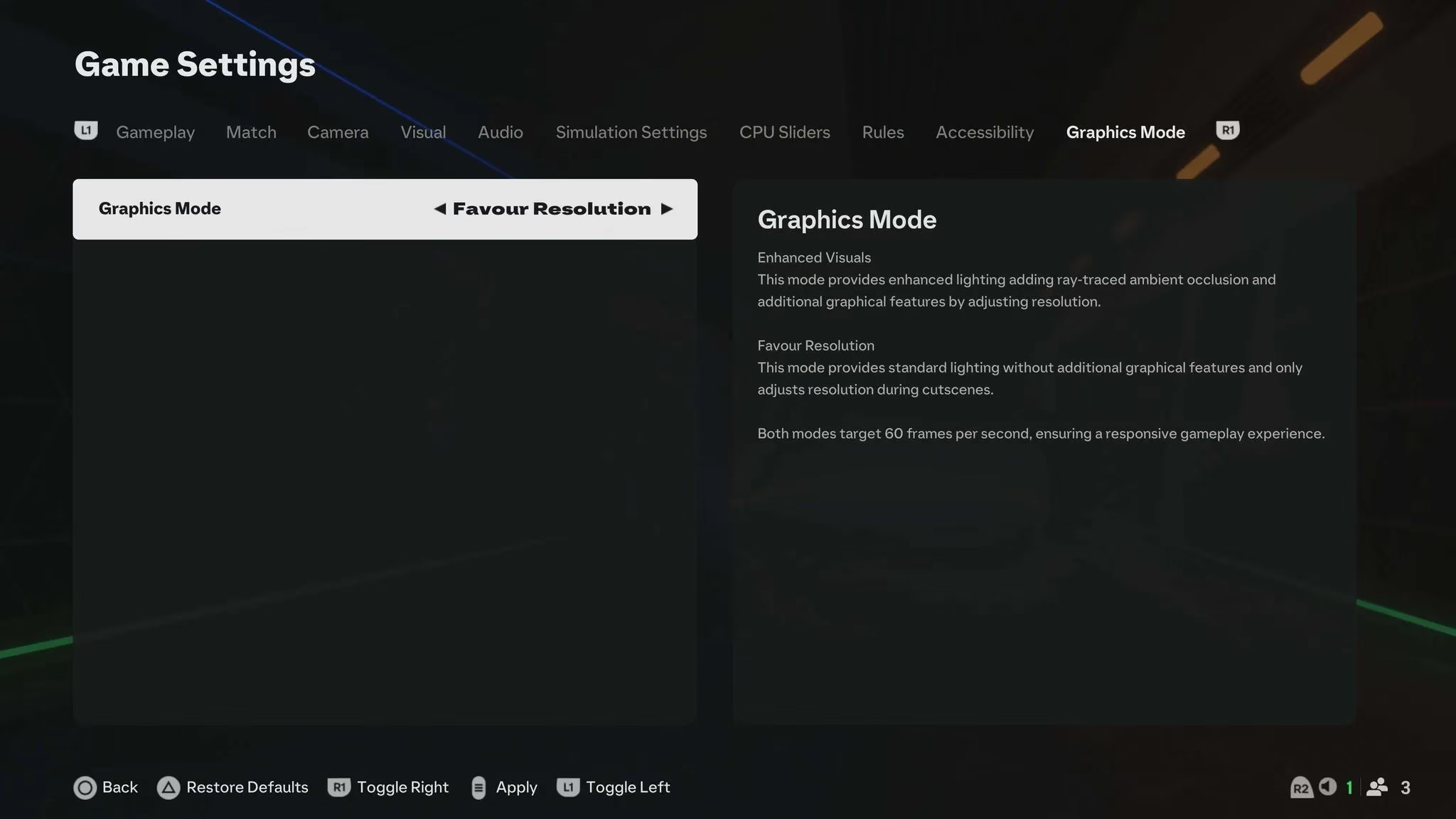
The absolute key to reducing, and honestly almost eliminating, lag in EA Sports FC 25 is changing one single setting. It's all about the Graphics Mode. Here’s the step-by-step guide I followed that worked like a charm:
-
Boot up the game and get to the main menu.
-
Look for the cog/gear icon in the top-left corner of your screen and select it.
-
Go into Settings, then choose Game Settings.
-
Press R1/RB a few times to navigate to the 'Graphics Mode' tab.
-
Switch the option from 'Enhanced Visuals' to 'Favor Resolution'.
That’s it! This simple switch made a night-and-day difference for me. The process is super straightforward and takes less than a minute.
So, what's the deal with these two modes? 🤔 Both aim for 60 FPS, but they achieve it differently:
-
Enhanced Visuals Mode: This is the fancy one. It adds extra graphical bells and whistles that make the menus and (arguably) the pitch look a bit sharper.
-
Favor Resolution Mode: This mode strips away those extra visual features in the menus to prioritize smooth, fast performance.
The core issue is that those "Enhanced Visuals" really bog down the menu navigation, especially in Ultimate Team. When you're trying to quickly move between an incomplete Squad Building Challenge and your club roster, any slowdown is painfully obvious. By choosing 'Favor Resolution,' you're telling the game to prioritize speed over those extra visual details in the menus, resulting in buttery-smooth scrolling.

My Personal Verdict After Testing:
For me, 'Favor Resolution' is the undisputed winner. 🏆 Here’s my quick pro/con list:
| Setting | Pros | Cons |
|---|---|---|
| Favor Resolution | ✅ Zero menu lag, super fast navigation. ✅ Consistent performance during matches. ✅ The best for competitive play. |
❌ Menus are slightly less visually detailed. |
| Enhanced Visuals | ✅ Menus look a bit prettier with extra effects. | ❌ Significant menu lag and stuttering. ❌ Can feel unresponsive during critical moments. |
In a game where split-second decisions in the menus and on the pitch determine wins and losses, ensuring minimal lag disruption is simply non-negotiable. I'd choose smooth, responsive gameplay over a slightly shinier menu any day of the week. The visual difference in actual matches is negligible to my eyes, but the performance boost is massive.
EA Sports FC 25 is still the go-to soccer game for millions of us building our dream teams. While lag and input delay have been annoying ghosts from past games, switching to 'Favor Resolution' has been the definitive fix for me in 2026. It ironed out all the hiccups and made the game feel crisp and responsive again. If you're struggling with slowdowns, try this setting change first—it's the most effective tweak you can make! Your Ultimate Team grind and your win rate will thank you. 🙌 Have you tried this fix? Let me know how it worked for you!
Comments